
Sales Pipeline Health
For the sales leader or analyst who wants to know why a deal was flagged, and to change the rule that flagged it.
Last updated September 9, 2026
Every flag has a reason. Every rule is yours to shape.
Sales Pipeline Health is a project you start from a template and then edit. It reads your open quotes and your customers' order history, applies four rules that are each written down on a page you can open, and puts the result in one review you work from.
This page is about the mechanism: what it reads, what it calculates, what it writes, and where you change it. Everything below is the sample project, which loads twelve invented EUR deals reviewed as at 7 September 2026. Sample figures are not NetSuite results, and no customer outcome is described anywhere on this page.
Where this is heading. The working project is a review you run; the direction it points at is a pipeline that notices for you between reviews. The animation below is that direction as a concept, before the mechanism this page explains.
Follow one deal from question to next step
The review opens on the whole population. Twelve quotes total €695,000; at the initial settings fourteen flags point to seven deals worth €523,000. A deal is counted once no matter how many checks flag it.
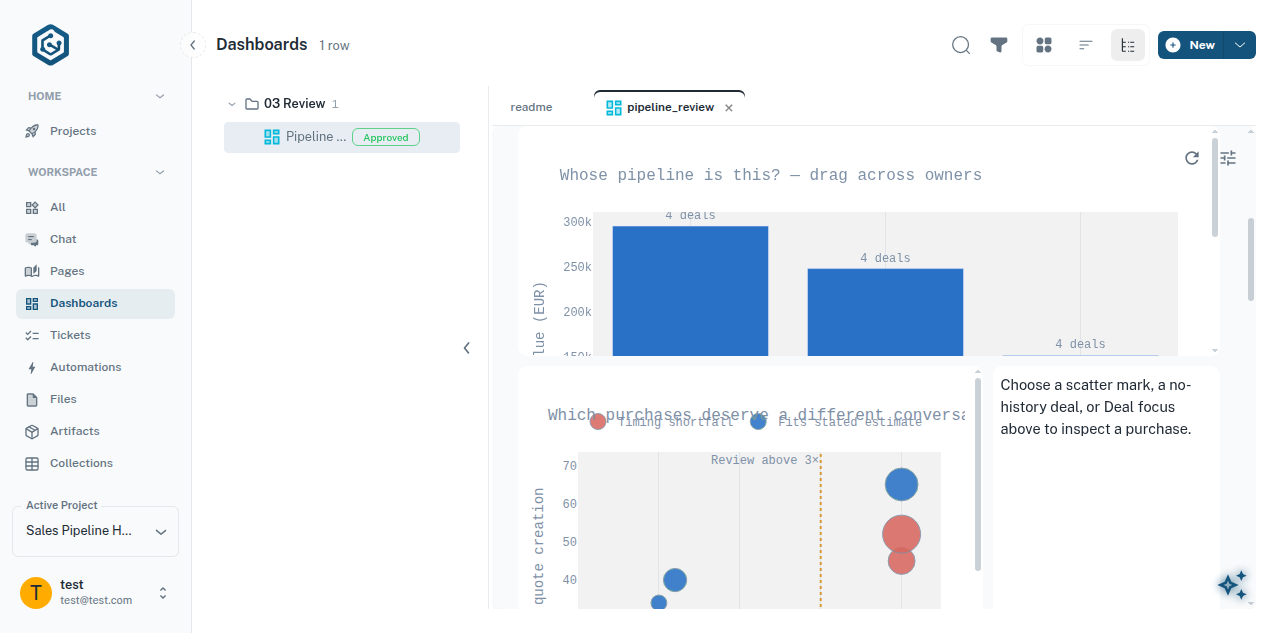
Sample data. The dashboard asks two questions at the top — whose pipeline is this, and which purchases deserve a different conversation. The dotted line on the scatter is the 3× review threshold.
Every chart is a filter. Dragging across owners on the bar chart binds the selection to the whole page, and the summary cards recount against it.
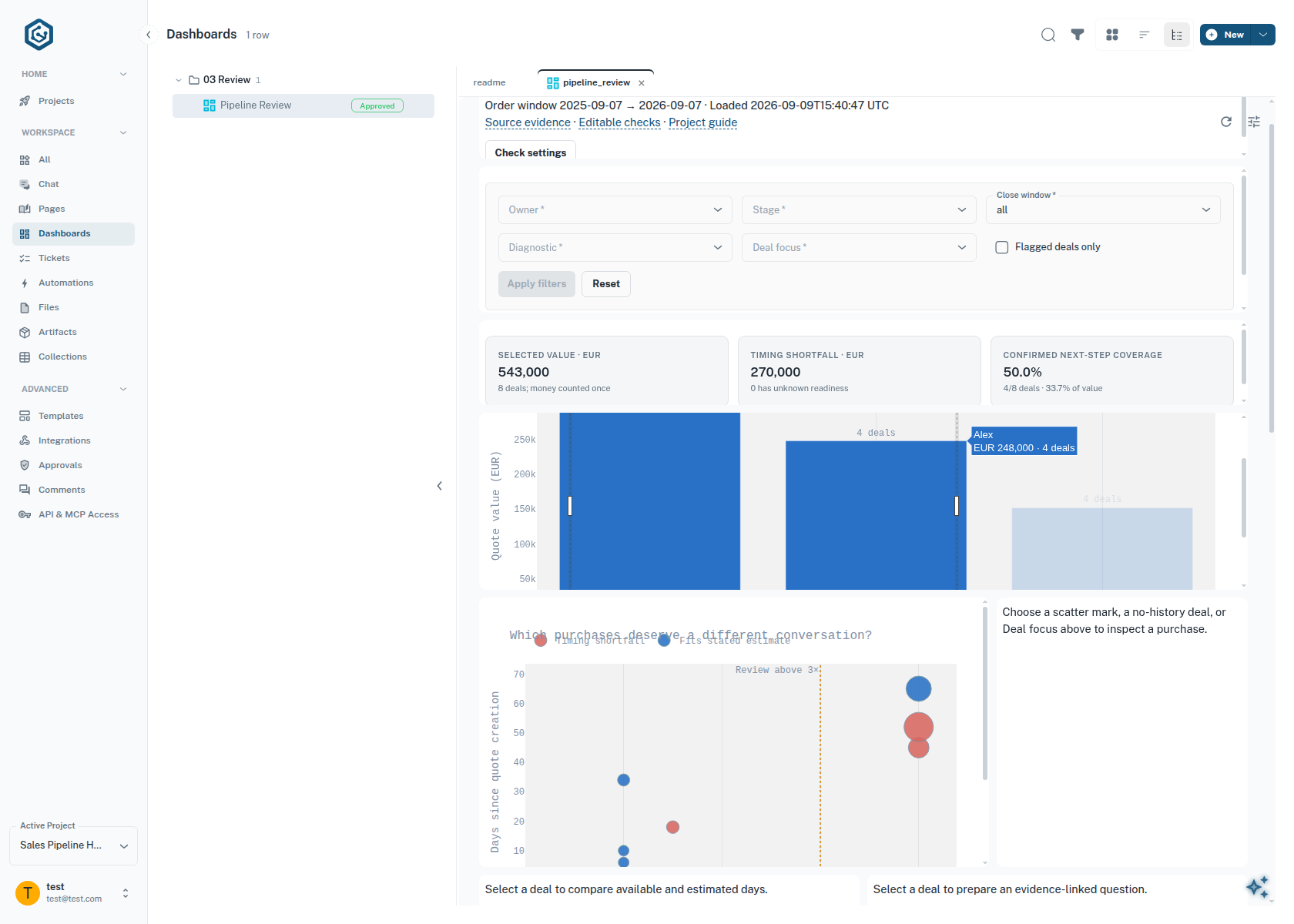
Sample data, and a selection rather than the portfolio. These cards describe the eight deals belonging to two owners — €543,000, four of them with a confirmed next step. Across all twelve the same measure is 5/12 by count (41.7%) and €243,000 of €695,000 by value (35.0%). Always read the denominator.
Birch is the deal this page follows. It is an ordinary customer with an unfamiliar quote on it.
One signal is not a verdict, which is why the sample carries deals that argue with
each other. Fir is also a 4× purchase, but it has +3 days of slack and a confirmed
next step. Iris has only two prior orders, so it gets no multiple at all — its
history is marked insufficient, not zero. Cedar and Oak have no order
history and no close date; they stay selectable, and their €47,000 is reported as
unknown readiness rather than folded into a total.
Starter and Advanced
Two templates carry this capability. Neither imports the other's files, and neither shares the other's saved review.
| Starter | Advanced | |
|---|---|---|
| Reads | Quotes | Quotes and customer order headers |
| Checks | Age, size and edit recency | Those, plus customer-relative purchase size and close-plan timing |
| Human input | — | A review form: next step, owner, date, buyer confirmation, days remaining |
| AI | — | An assessment you request per deal, linked to its evidence |
| Output | A flag list | One cross-filtered review, a briefing and a CSV |
Start with Starter if you want the smallest readable example of the pattern. The rest of this page describes Advanced.
How the project fits together
The project is a folder of files, numbered so it reads in the order the work happens.
readme.page.py                     the project guide; loads the sample
_01_data/
  deal_data.page.py                quotes and orders, accepted together
  sample_data.module.py            twelve synthetic deals, 47 orders, EUR
_02_analysis/
  aging_deals.page.py              age_days > days
  large_unedited.page.py           amount > threshold AND since_edit_days > days
  customer_context.page.py         quote_size_multiple against the customer's median
  close_readiness.page.py          schedule_slack_days, and the review form
_03_review/
  deal_flags.page.py               the contribution roster and its totals
  deal_brief.page.py               evidence packet, assessment, briefing
  pipeline_review.dashboard.py     the cross-filtered investigation
_shared/
  pipeline_runtime.module.py       composition, selection, saves, CSV export
  presentation.module.py           the reusable figures and tables
components/
  linked_chart.component.tsx       chart marks bound to the shared filters
  deal_notes.component.tsx         the review editor
  check_settings.component.tsx     the filter bar
Each page in _02_analysis/ owns one rule and exports one function, evaluate, that
returns rows shaped deal_id · check_id · label · reason · source_ref. A shared
function in _shared/pipeline_runtime.module.py calls the roster of those pages over
the accepted evidence and the saved review, every time any view is drawn. There is no
cache of flags for a view to wait on, and no second copy of a rule inside the
dashboard.
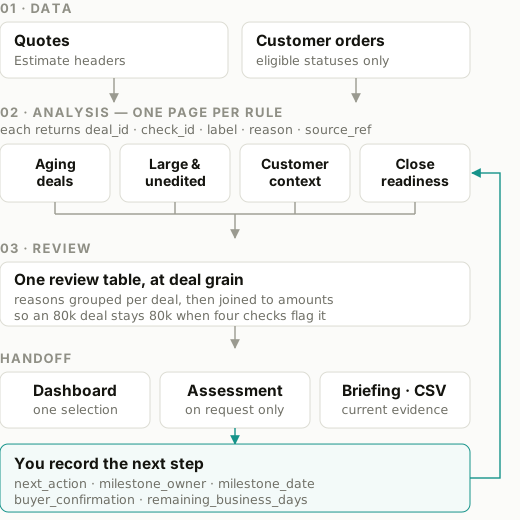
The loop at the right is the part worth noticing: the estimate you save is an input to the calculation you are reading.
Inspect the inputs and the calculations
The population is explicit. _01_data/deal_data.page.py holds it. Quotes are
NetSuite Estimate headers in one currency you nominate — there is no FX conversion
and no join down to transaction lines. Orders are a separately chosen Sales Order
population: the page discovers your account's status codes and you enter the ones that
mean a purchase, because the template does not assume what a status means in your
account. The history window defaults to 12 months. Both extracts must succeed before
either replaces the accepted evidence, and a failed refresh leaves the previous
evidence in place with the failure visible.
The sample loads with a fixed review date of 2026-09-07 and a history window of 2025-09-07 to 2026-09-07.
Customer context. Orders are aggregated to the customer before they are joined to quotes, so one customer's history is context for each of their quotes rather than a multiplier on the money.
eligible = orders[orders.amount > 0]
history  = eligible[eligible.customer_id.eq(deal["customer_id"])
                    & eligible.currency.eq(deal["currency"])]

order_count         = len(history)
median_order_amount = history.amount.median() if order_count >= minimum_orders else None
quote_size_multiple = deal["amount"] / median_order_amount if median_order_amount else None

if quote_size_multiple > size_multiple_threshold:   # strictly above
    flag("unusual_purchase")
Defaults are minimum_orders = 3 and size_multiple_threshold = 3. Below the
minimum, history_status is insufficient and no multiple is produced; with no
orders at all it is no_history. Hazel sits at exactly 3.0× and is therefore not
flagged — the comparison is strict.
Close readiness. Available days are weekdays after the review date through the close date, and the estimate of work remaining is a number a person saved.
def business_days(start, end):
    """Weekdays after start, through end. Negative if the close date has passed.
    No holiday calendar."""
    ...

business_days_to_close = business_days(review_date, deal["estimated_close_date"])
schedule_slack_days    = business_days_to_close - review["remaining_business_days"]

if schedule_slack_days < 0:
    flag("timing_shortfall")
For Birch: business_days("2026-09-07", "2026-09-21") is 10, the saved
remaining_business_days is 15, and the slack is −5. A missing close date or
a missing estimate leaves readiness_status as unknown; zero days remaining is a
valid answer and not the same thing.
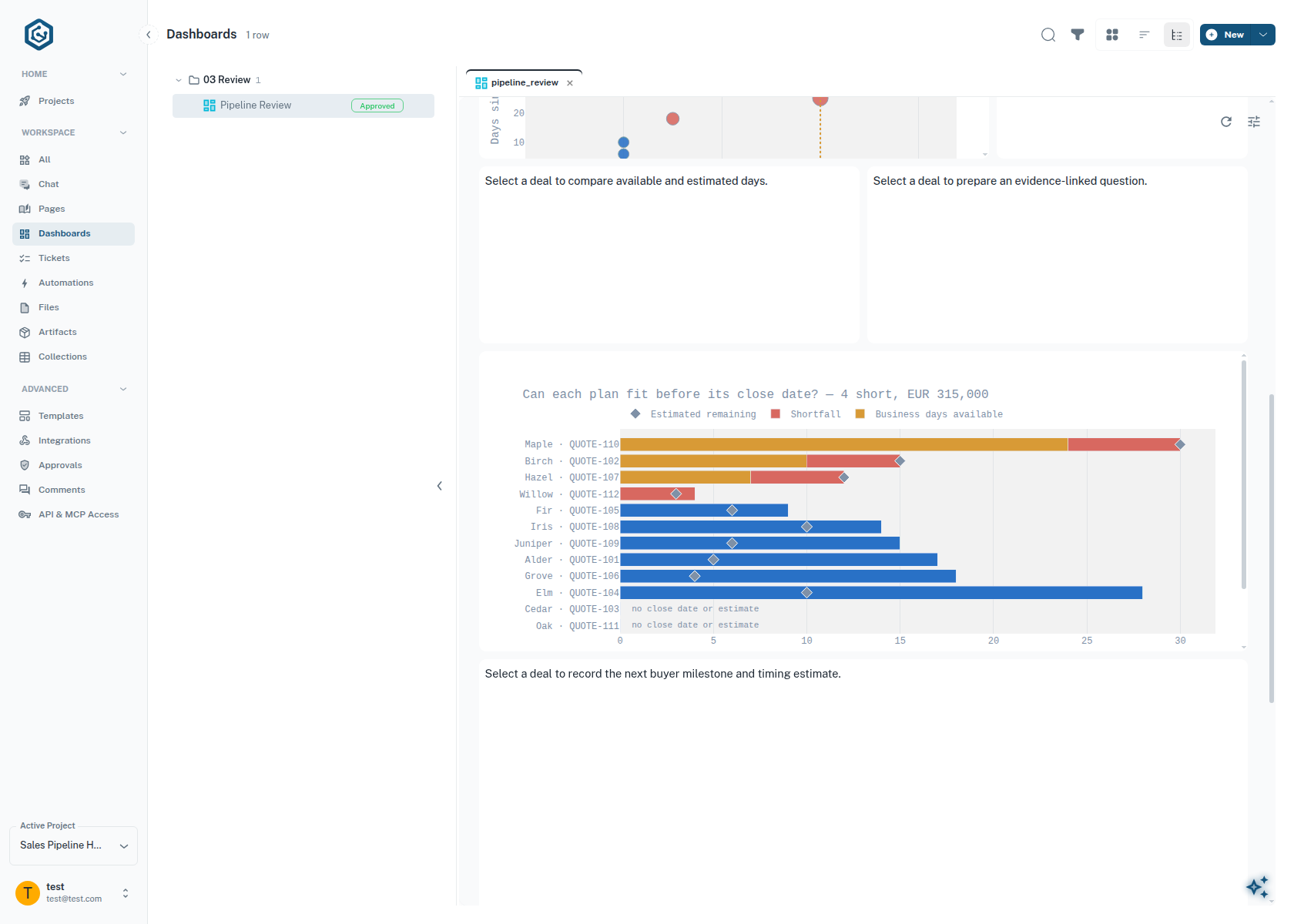
Sample data. Four plans do not fit their dates — Maple, Birch, Hazel and Willow, €315,000 between them. Cedar and Oak are shown as having no close date or estimate rather than being dropped from the chart.
Confirmed next step. A next step counts as confirmed only when all four parts are present — an action, a named owner, a milestone date in the future, and explicit buyer confirmation:
next_step_confirmed = (buyer_confirmation == "confirmed"
                       and next_action and milestone_owner
                       and milestone_date > review_date)
The other two rules are deliberately small, and they are the ones to read first if you
want to see the shape: aging flags age_days > days (default 30), and
large_unedited flags amount > 50,000 AND since_edit_days > 15. Both comparisons in
large_unedited must hold. Every threshold is a form at the top of its own page.
Understand the shared output
Everything lands in one table at deal grain. Flag reasons are grouped per deal before amounts are joined, which is why an €80,000 deal carrying four flags still counts as €80,000 once.
| Column | What it holds | Written by |
|---|---|---|
deal_id |
The quote, one row per deal | _01_data/deal_data.page.py |
quote_size_multiple |
Quote ÷ the customer's median order, or empty | customer_context.page.py |
schedule_slack_days |
Business days available − days estimated remaining | close_readiness.page.py |
check_id · label · reason · source_ref |
One entry per flag, grouped into a list per deal | each analysis page |
next_action |
The next step, in words | you, in the review form |
milestone_owner · milestone_date |
Who owns it and when it is due | you, in the review form |
buyer_confirmation |
unknown, assumed or confirmed |
you, in the review form |
Human review is stored separately from source data, in its own collection, and the sample and a connected account keep separate stores. Reloading the sample preserves what you saved. Saving is a latest-value write with a stale-edit check: if someone else saved the same deal since you opened it, your save is refused and you reconcile rather than overwrite. It is not an audit history.
The CSV export carries the same columns plus the provenance of the run — source mode, when it was loaded, the review date, the history window and the filters that were active.
Prepare the conversation, then record what was agreed
Assessment runs only when you press the button, on one deal at a time. The model
receives a packet built from that deal's own evidence — the quote facts, the purchase
comparison and its orders, the timing calculation and the saved human review — each
under a labelled evidence ID that points back at the page it came from. It returns at
most four observations, each tagged fact or inference and each citing at least one
of those IDs, at most four gaps, and one suggested buyer question. A response citing
anything that was not supplied is rejected and nothing is saved.
For Birch the shape of that output is: the facts are the 4× multiple and the −5 day gap; the inference is that a purchase this size may follow a different approval route; the gap is that the buyer has not confirmed the path. The question that follows is of the form who can confirm the approval route and dates for this larger purchase?
Each saved assessment keeps a fingerprint of the packet that produced it. Change any input — a threshold, an estimate, a fresh source load — and it is marked stale. A stale assessment stays readable on the page, and is left out of any briefing prepared afterwards. A briefing prepared with no assessment at all is a normal outcome: it is built from the evidence and your saved review, and it needs no model.
Three lines are worth keeping straight, because the whole design turns on them:
- A calculation supplies a fact.
- An assessment connects supplied facts and names what is missing. It does not produce a win probability, and it is not permitted to invent buyer activity.
- A saved next step is a human record. Setting
buyer_confirmationtoconfirmedasserts that the buyer agreed — a suggestion from the assessment does not make that true, and neither does saving a smaller estimate.
Change the analysis
This is the point of the project being files rather than a settings screen.
One convention to keep when you extend it: reuse next_action for the next step
rather than adding a parallel milestone field. There is one field for what happens
next, and milestone_owner and milestone_date describe it.
A pipeline that stays on watch
What this project does today is a review you run. The direction it points at is a pipeline that notices for you between reviews — deals rising into attention on their own, and an intervention proposed with its evidence already attached. The concept animation at the top of this page shows that direction.
Resources
- The Pipeline Review Field Guide — the six questions behind these checks, with their sources. The industry practices are established; the arithmetic and thresholds here are our adaptation of them, not a benchmark.
- The template source — every file listed above is in the project you started, and every one of them is editable in place.
- Sales pipeline intelligence — the same investigation as a business case, with the platform foundation it stands on.
- Starting from a template — how to get your own copy.
- Connecting your NetSuite account — what the integration role can read, before you point this at live data.
- Asking for a dashboard — how the boards in this project are built, and what a board can and cannot do.